Building a job-matching platform: from concept to self-hosted MVP - Part I

Recently, I built a full-stack web application for a client with a unique recruitment concept. The goal was to make a "blind" matching system between recruiters on the one hand and candidates on the other. Candidate data remains private until a mutual match is confirmed. AI also lends a hand to properly match job titles, addressing struggles on either side of the hiring process.
The idea began with my client, an experienced recruiter with over 10 years in the field who had a design prototype but needed an actual, functioning MVP for his concept—a small full-stack app, based on his UI mockups. Overall, something that could handle complex matching logic without dealing with the high monthly costs of managed cloud hosting.
This series breaks down how I built the application using the MERN stack and why we made the unconventional decision to self-host on a Linux VPS early on.There is a lot to cover so I’m discussing the process in three parts. Part I will provide key information about the backend, explaining what the app is and the AI-supported matching algorithm that helps with ambiguous job titles. Part II will cover the frontend and Part III will be all about the hosting infrastructure.
Let’s get into it…
Background: what the app is and how it works
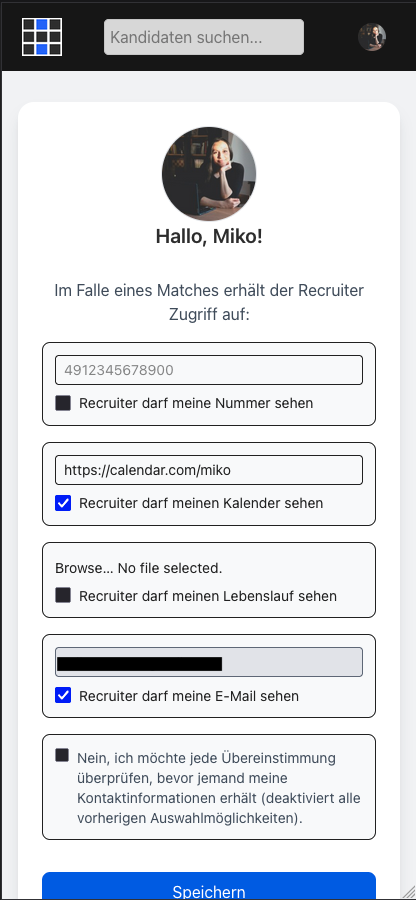
The app is called hirewall and it compares information from the recruiter’s offered job and the candidate’s preferences. Candidates can choose the information they want to show recruiters once a match is made. Recruiters can only see candidates’ chosen information if there is a match. If there is no match, recruiters are shown previews of other candidates who did match the criteria.
Let’s say you get a message on LinkedIn from a recruiter. Before starting a potentially impractical exchange, you can send them your default “Copy&Paste” message from your hirewall account, directing them to your profile.
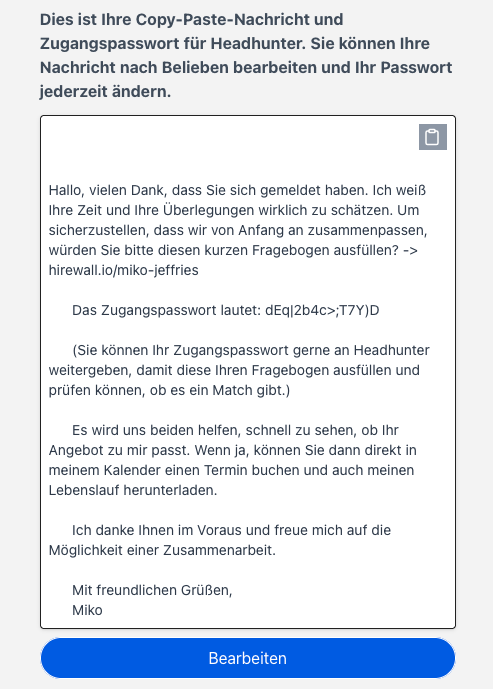

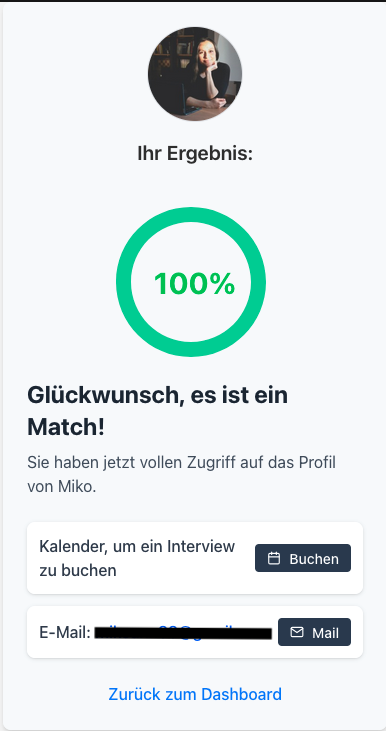
Once the recruiter enters your access password, they fill out a questionnaire to see if there is a match. If there is a match of 70% or more, they will ONLY see the information you consented to share in your hirewall settings.
If it isn’t a match, the recruiter gets to see previews of other people who DID match the criteria, if there are any.
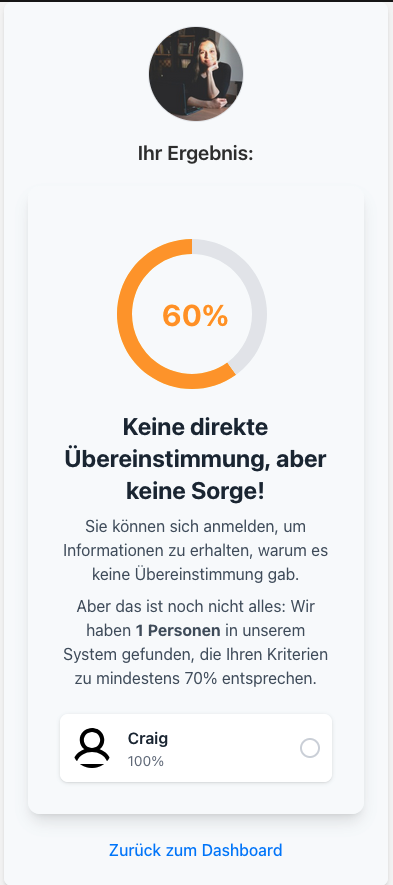
This saves a lot of time while also increasing the chances of recruiters finding the right person for the job. Additionally, candidates have better chances of finding their dream role, especially with AI integration to help with the varied wording of job titles.
Why MERN?
I chose MongoDB, Express, React, and Node.js (MERN) for two main reasons:
- Faster delivery: With a tight deadline, I could use JavaScript across the entire stack while reusing functions and types between the backend and frontend. This re-use of functions and types also made the result easier to understand for potential collaborators in the future, and therefore more maintainable—especially since MERN is a very common stack in the developer world.
- Flexible data: MongoDB’s document model let me add new fields to the different documents in the code, without needing to regularly write migration scripts and restructure the database itself.
In hirewall, a recruiter filling out a questionnaire shouldn't see candidate information until there's a match. But once matched, that candidate's consented contact details need to be frozen in time, even if the candidate updates their profile later.
The schema uses four collections to handle the matching lifecycle. The User collection serves both candidates and recruiters, differentiated by a role array field. Each candidate has one Questionnairedocument (their form with job preferences, such as location and salary expectations). When a recruiter fills out a job description for a specific candidate, it's saved as a RecruiterQuestionnaire—capturing that moment-in-time opportunity. Finally, when a match occurs above the 70% threshold, a Match document is created that freezes the candidate's consented contact information as a snapshot. This design keeps concerns separated: Users handle authentication and roles, Questionnaires store candidate preferences, RecruiterQuestionnaires capture job offers, and Matches preserve consent agreements.
The secret sauce: AI-supported matching in the backend
The core of hirewall is accurate matching without requiring recruiters to see candidate profiles first. But job titles are a mess: "Software Engineer", "Software Developer", "Programmer" and "IT Specialist" might all mean the same thing, while "Junior Software Engineer" could be a dealbreaker for a senior candidate.
Keyword matching fails here because a regex search for "Engineer" would match both "Software Engineer" and "Sanitation Engineer." Even string distance algorithms like Levenshtein don't understand that "Scrum Master" and "Project Manager" are closely related roles despite having zero character overlap.
This is where AI integration became essential.I chose Google's Gemini 2.5 Flash Lite for the job but because the prompt is very simple, any LLM on the market would do.
The AI Prompt
The getAITitleMatch function sends a carefully structured prompt that frames the AI as a technical recruiter evaluating fit:
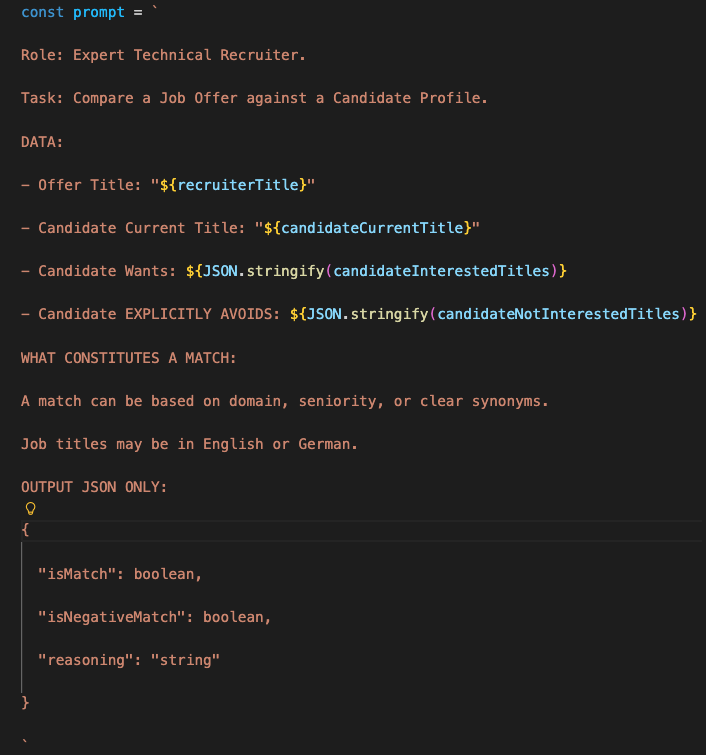
The key insight is the isNegativeMatch flag so candidates can explicitly exclude certain roles. For example, someone might want "Software Engineer" positions but never "Junior Software Engineer" ones. The AI checks the exclusion list first, preventing false positives.
Timeout handling and race conditions
AI API calls can hang or take unexpectedly long. Rather than letting the entire matching process stall, I implemented a Promise.race pattern with a 10-second timeout:
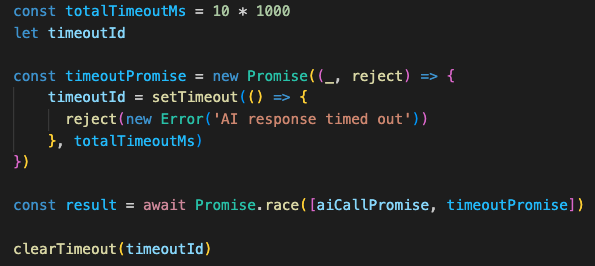
If the AI responds within 10 seconds, the timeout is cleared and processing continues. If not, the promise rejects and the system falls back to keyword matching. Without this pattern, a slow AI response would freeze the entire matching flow, degrading user experience even when the fallback logic could have provided a reasonable answer.
An idea for the future could be to use a platform like OpenRouter where multiple LLMs are housed under one roof. In other words, if one AI fails, another model will automatically be tried. This reduces the chances of the hirewall falling back to regex-based, whole-word matching.
The five-criteria scoring system
Including job title matching, the calculateMatch function evaluates five criteria:
- Job title
- Location distance - Using MongoDB's geospatial queries to calculate actual distance from coordinates
- Salary overlap - With a 5k EUR buffer to account for negotiation range
- Branch exclusions - Checking if the recruiter's industry is in the candidate's blocked list
- Remote preference alignment - With special override logic when both parties want fully remote
Each category is either a match or not. The final score is (matchCount / 5) * 100, and a match requires both ≥70% AND a job title match. This means the job title is effectively weighted higher. Even if all other criteria match perfectly (80%), a job title mismatch prevents a match.
Remote work override: location becomes irrelevant
The algorithm includes special logic for fully remote positions. If both the candidate requires remote work (remoteChoice: true) and the recruiter offers it (remoteChoice: 'remote'), distance matching is bypassed entirely.This prevents situations where a perfect remote match fails because the candidate lives 200km away. In this case, geography is irrelevant.
Finding similar candidates: pre-filtering before AI
When there's no match, the system searches for other candidates who do match the recruiter's criteria and displays a preview of their profile. But running AI checks on thousands of candidates would be noticeably slow and expensive.
The findSimilarCandidates function implements a two-stage filter:
Stage 1: Cheap database queries - Filter first by initial branch preference, then by salary range, and finally by distance preference (considering remote option as well) using MongoDB queries. When thinking of running the app in production at scale, this approach typically reduces candidates from thousands to dozens.
Stage 2: Expensive AI matching - Only run full calculateMatch (including AI title check) on the pre-filtered set.
Find all candidates that are not the current one AND whose excluded branches don’t match the recruiter’s branch:

Looping through the selected candidates, compare the target salary with the recruiter’s offer along with distance and remote preferences to filter out any incompatibilities before reaching AI:
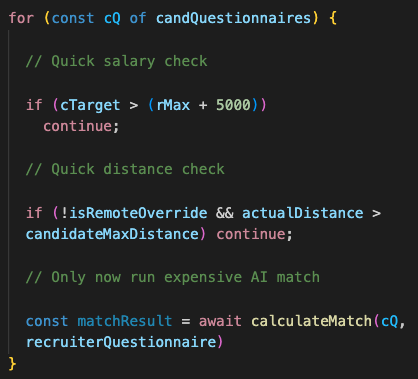
This ordering matters. Checking salary (a number comparison) is extremely fast. Checking distance involves coordinate math but also completes very fast. Running the AI takes 500-2000ms. By filtering first, most candidates never reach the AI step.
Storing frozen consent: the Match document
When a match occurs, the system creates a Match document that freezes the candidate's consented contact information at that moment:
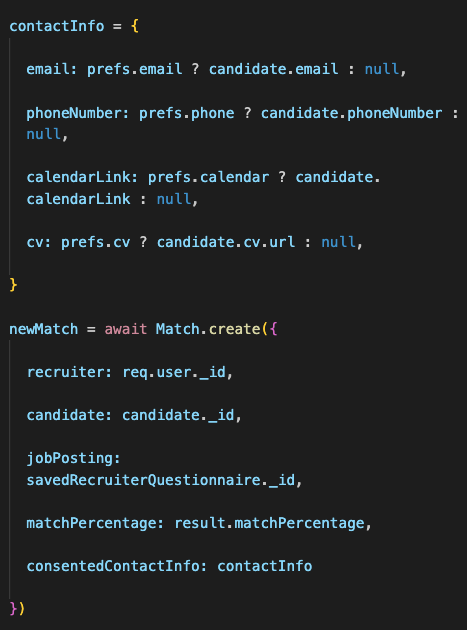
This snapshot approach solves the consent timing problem mentioned earlier. If a candidate later revokes their phone number consent, recruiters who matched before that change can still see it in their historical matches. The Match document represents a point-in-time agreement between the candidate's privacy preferences and the recruiter's access.
Why AI integration was worth the complexity
Adding AI increased code complexity by adding timeouts, fallbacks, JSON parsing and error handling. But the alternative was building a massive synonym dictionary and maintaining it as job titles evolve. This actually could be a great optimized approach in the long run by using a kind of lookup table (LUT) when there are over 100 users or so. An initial “dictionary” could be made with AI to get as many synonyms as possible with metrics for measuring how close one job title is to another. This “offline” pre-processing step would significantly reduce AI queries in production, saving a ton of money.
What’s useful about AI is that it handles edge cases like multilingual titles ("Softwareentwickler" = "Software Developer"), seniority variations ("Senior Backend Engineer" vs "Lead Backend Engineer"), and industry-specific synonyms ("Scrum Master" relating to "Agile Project Manager") without explicit programming.
The fallback logic ensures the system degrades gracefully. Rather than seeing an error, users get slightly less intelligent matching when AI is unavailable.
In Part II, I'll cover the React frontend, including how candidate profiles are structured, how the matching interface updates in real-time, and how privacy controls are presented to users.